
UX / Product Design — Case Study
Employee experience app
One platform, four workflows, three personas, and two authentication models, designed to scale from enterprise campuses to public-sector organizations through configuration-driven experiences.
Role
Technical Product Manager / UX Designer
Product
Employee Experience Platform
Users
Employees, Administrators, and Guests
Challenge
One platform supporting four workflows across different organizations and access models
Solution
A configuration-driven experience built from a single codebase
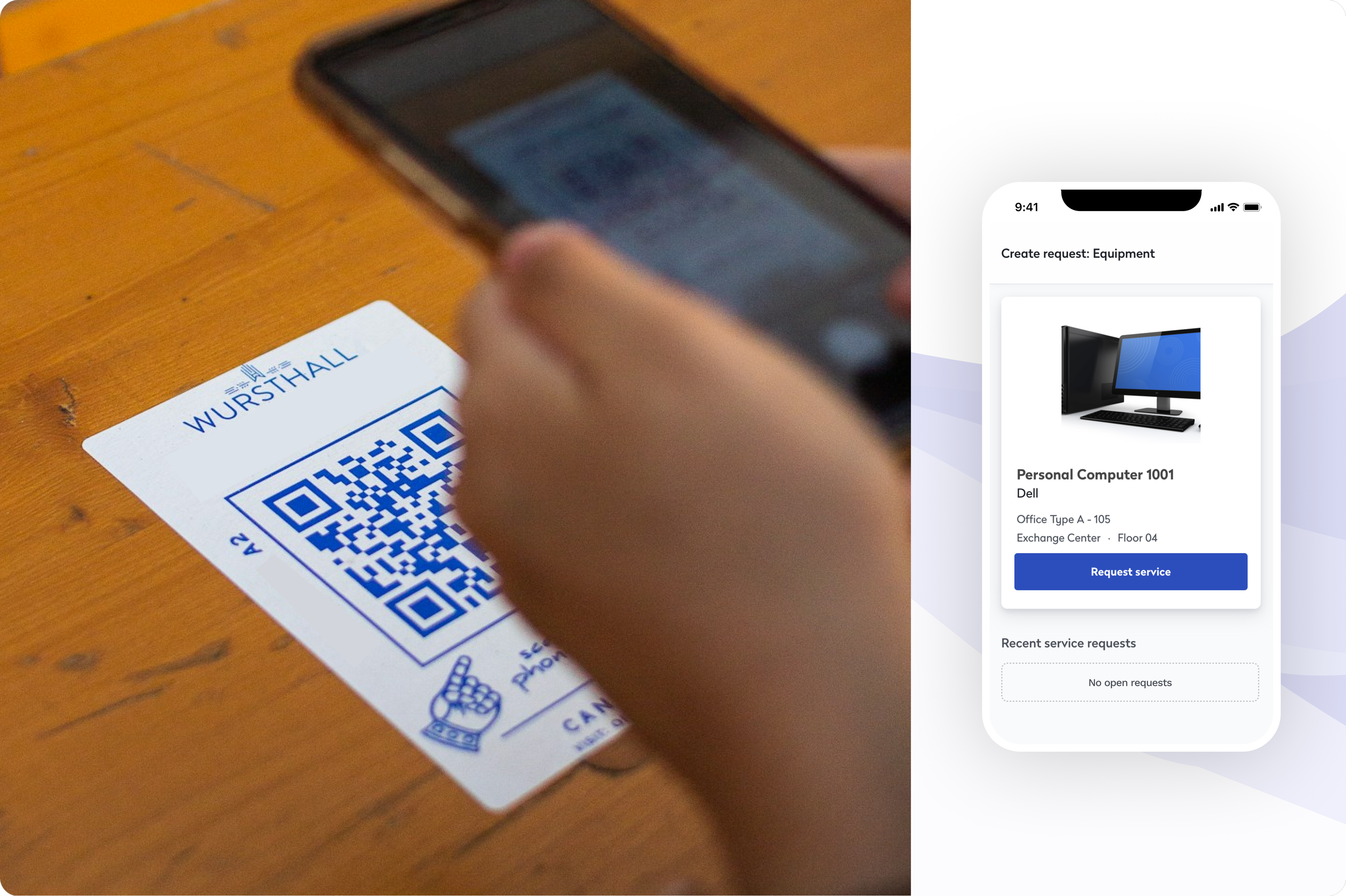
The Employee Experience app brings four workplace tasks into one product: finding a person or a space, booking a working space, booking a meeting space, and creating a service request. It's used by administrators, employees, and guests, and it's entered from a phone, a kiosk, a shared tablet, or a QR code attached to a desk or a door.
I designed the system so one codebase could serve very different deployments — a corporate campus that wants all four workflows open to everyone, and a municipal office that wants exactly one workflow open to the public and nothing else.
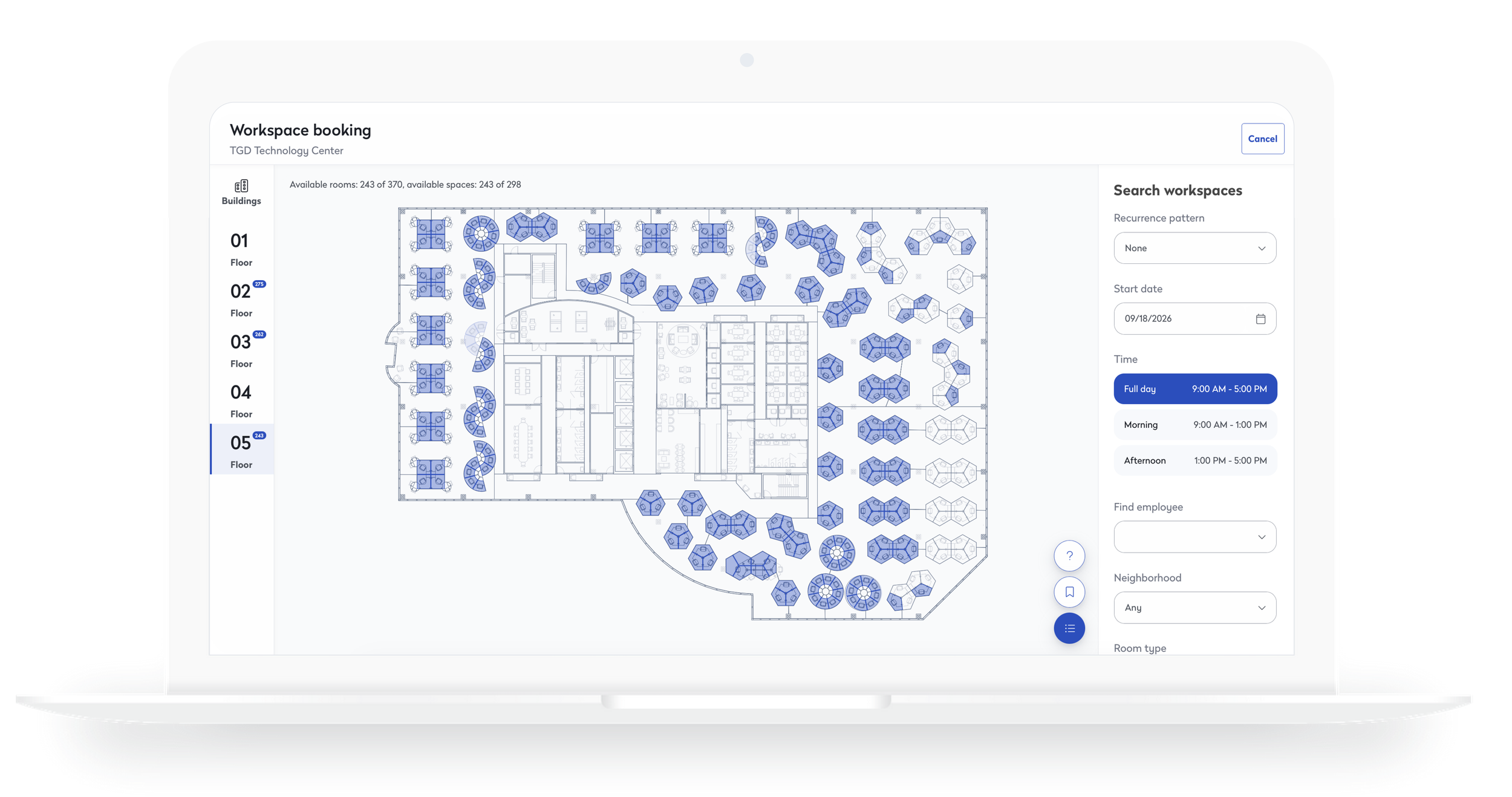
Employees can find and reserve available workspaces directly from an interactive floor plan, with filters adapting to each organization's needs.
The challenge
No two organizations roll this out the same way. A corporate campus might want the full set — wayfinding, desk booking, meeting room booking, and service requests — available to every employee and guest. A smaller office might only care about wayfinding and desk booking. A municipal building might want a single workflow, service requests, open to anyone who walks in, with no login required at all.
Solving this problem began with defining the application's primary user groups. The platform serves employees, guests, and administrators, each with different levels of access and visibility. Those distinctions drive what users can see, which workflows they can access, and how they interact with the system.
Administrator
Sets the rules
Configures the organization’s rollout: which of the four workflows are live, which authentication mode applies, and what guests are allowed to see.
Employee
Signed in, full context
Authenticates through the organization’s SSO or basic login, and sees whichever workflows the organization has enabled for employees.
Guest
No account required
A visitor without a login of their own. Can act without signing in — and sees only what the organization has chosen to expose.
Entry & authentication
People reach the app from four places: their own phone through the responsive app, a QR code posted at a desk or a meeting room, a lobby kiosk, or a shared tablet. What happens next depends entirely on how the organization has configured authentication.
An organization on SSO requires sign-in before anyone can proceed — a person scanning a QR code outside a meeting room is sent to log in first, every time. An organization on basic authentication can let people skip login for lower-stakes actions, like booking a room or filing a request. That difference matters: the fewer steps between scanning a code and finishing a task, the more people actually use it.
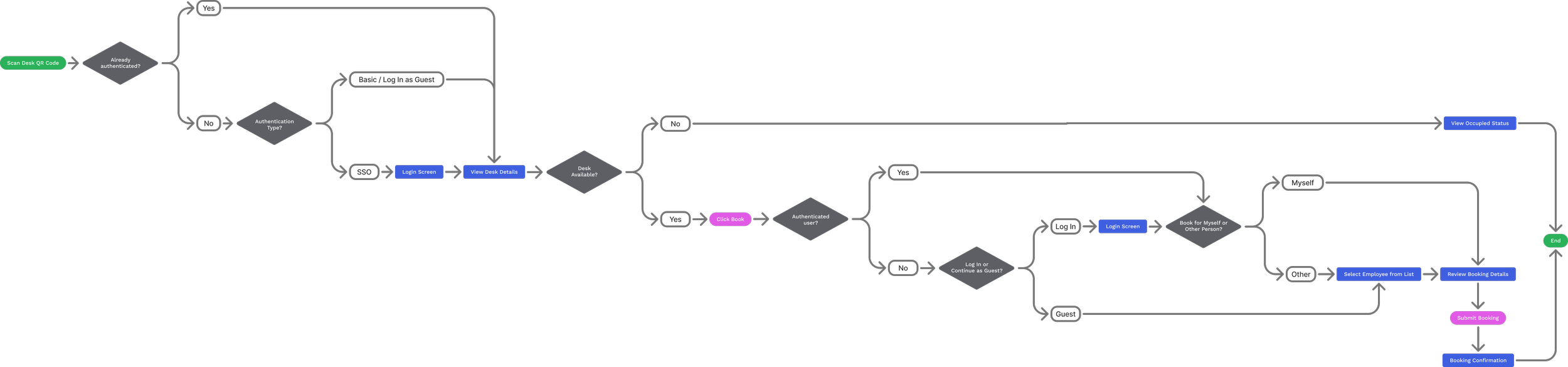
How the entry point and the organization's authentication mode determine whether sign-in is required before someone reaches the booking workflow.
Configurable by design
Which of the four workflows a person sees isn't hard-coded — it's a set of application parameters an administrator sets per organization, independently for employees and for guests. A guest's menu can look completely different from an employee's: an office might give employees all four workflows while limiting guests to service requests only.
A second parameter, available for guests only, can hide location-specific information. Instead of choosing "Room 214 — Finance," a guest picks from a list of room codes, with no access to the floor plan.
A third parameter works one level up, at the floor itself. An administrator can mark any individual floor as secured — an executive floor, a data center floor. Once it's secured, no Employee Experience user, employee or guest, can search for a person or a room on that floor or view its floor plan.
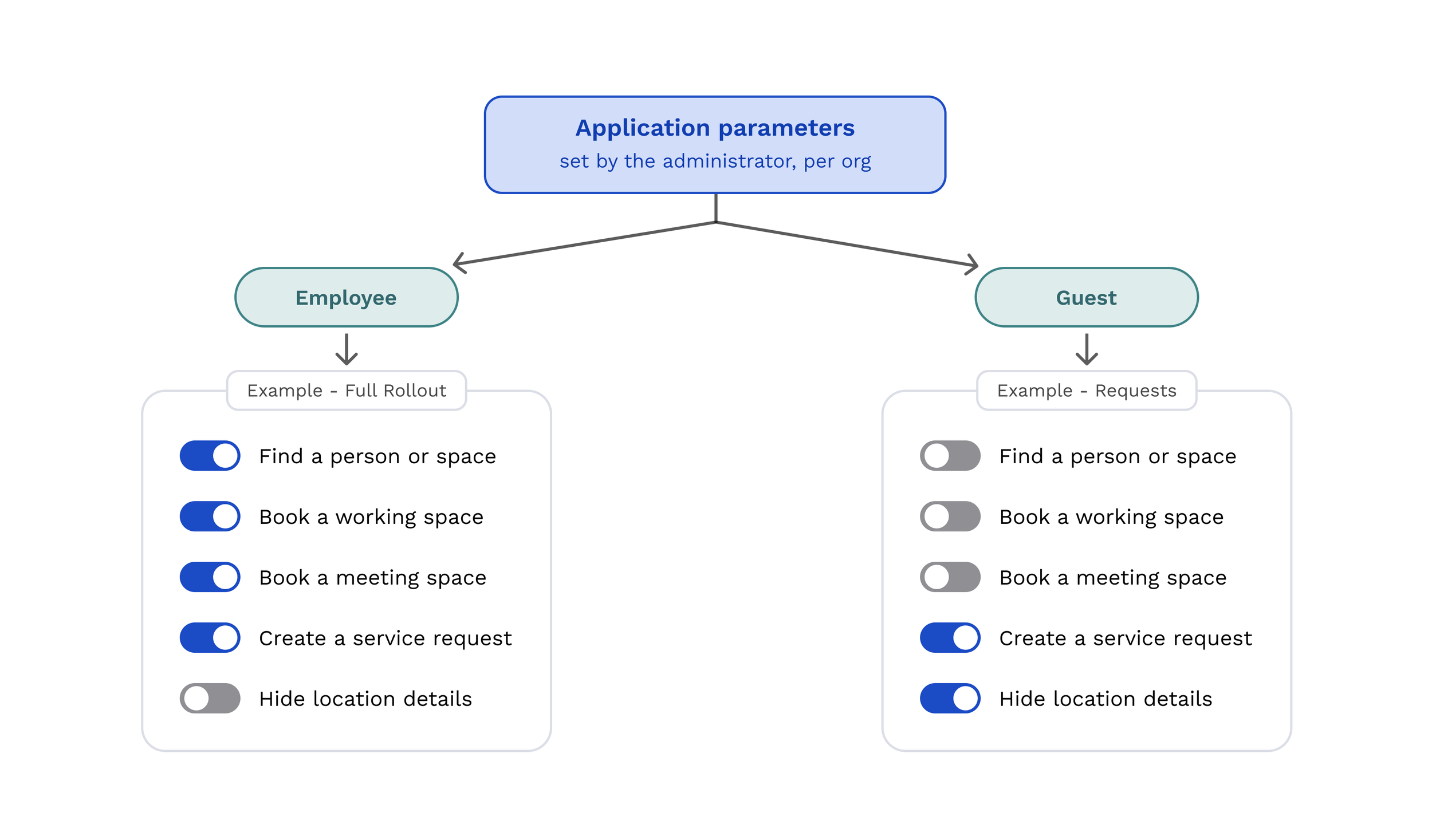
Two independent configuration paths — one for employees, one for guests — decide which of the four workflows appear, down to whether guests see room names and floor plan layouts or only a list of room codes.
Balancing collaboration and privacy
As the product matured, we discovered that visibility needed the same level of flexibility as access. Initially, every employee was searchable because that was the simplest experience to build. Over time, however, we learned that workplace participation and personal visibility are not the same thing. Many employees wanted to use booking and workplace services without sharing their photo, contact information, or seating location with everyone else in the organization.
To support these different preferences, I designed profile-level privacy controls that allow users to manage their visibility. Employees can choose whether their profile photo, contact information, and workplace location appear in search results while continuing to access booking and workplace services. Language preferences are also managed from the same profile experience, creating a single destination for personalization and account settings.
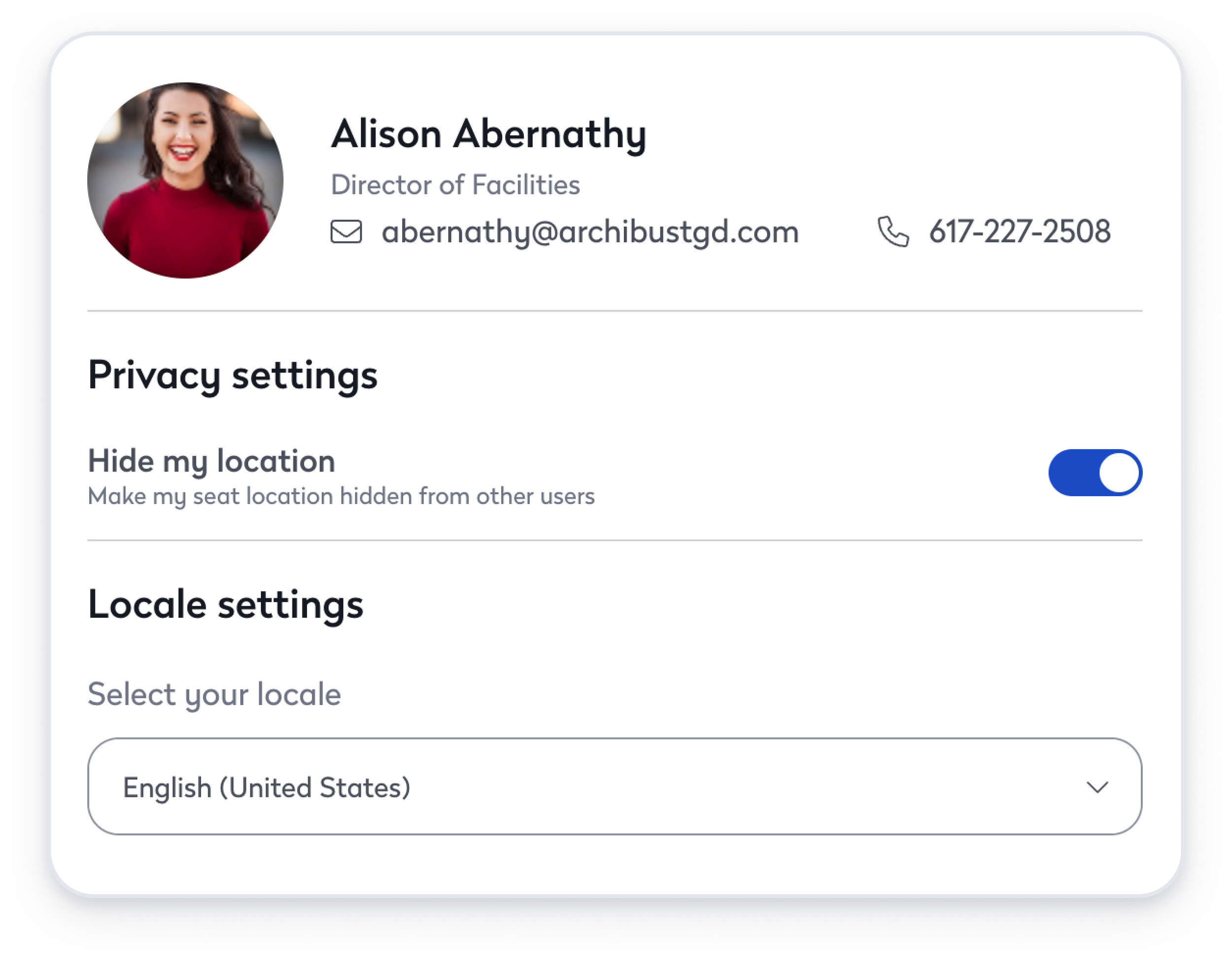
Privacy controls extend the platform's configuration model to the individual level, allowing employees to participate in workplace services without requiring full visibility to other users.
Applied: a municipal office
One scenario that shaped this: a government office required by policy to let any visitor report something broken — a leaking faucet, a flickering light — without creating an account, and without being handed a floor plan of the building.
Configured this way, a visitor scans the QR code taped to the fixture. Because the office runs basic authentication, they go straight into the service request flow with no login prompt. Every other workflow is switched off for guests, and the location parameter is set to hide room names, so they pick from a short list of codes instead of a directory of the building.
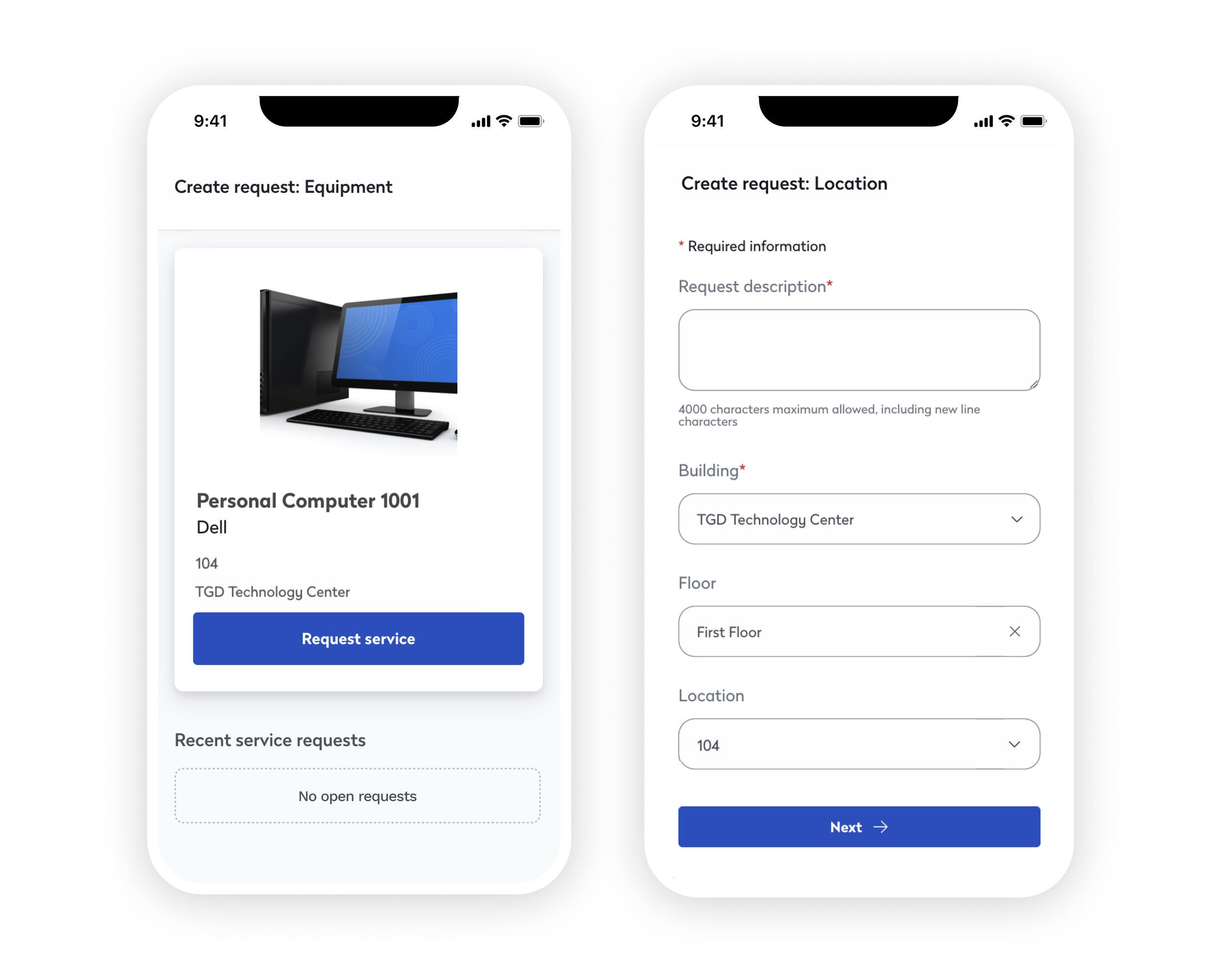
The same platform can be configured for public access, allowing visitors to submit location-specific service requests without creating an account or navigating the broader application.
Outcome
Because workflows, persona-level permissions, authentication models, and privacy settings are all driven by configuration rather than branching code paths, the same platform can adapt to very different organizational needs. An enterprise campus can enable workplace discovery and collaboration across thousands of employees, while a municipal office can expose a single public workflow and restrict access to everything else. Users themselves can decide how visible they want to be, choosing whether to appear in workplace searches while still participating in booking and workplace services. The result is a platform that adapts at the organizational, role, and individual level without becoming multiple products.