
UX / Product Design — Case Study
From Concept to Code: Building TeamTeach with AI-Assisted Design
I designed and built TeamTeach, a mobile-first platform that helps teachers, assistants, and therapists document student progress and collaborate around shared students.
To move quickly from concept to implementation, I developed the product alongside an AI coding agent, creating a scalable design system, 37 production components, and a fully functional onboarding experience in just two weeks.
Role
Product designer and design-system owner
Timeline
October 6-19, 2026 (2 weeks)
Tools
Figma, Claude Code, React, Tailwind CSS, Vitest, GitHub
Deliverables
Design system, 37 coded components, onboarding flow, token pipeline
One source of truth for design and code
As TeamTeach grew, consistency became as important as speed. Rather than styling individual screens, I built a system where every visual decision flows from a shared set of design tokens.
More than 330 variables are organized into four layers:
Primitive defines raw color, spacing, and typography values.
Brand assigns meaning to those values.
Mode maps them to light and dark themes.
Device adapts typography and spacing across screen sizes.
Components consume only Mode and Device tokens, creating a single source of truth for the interface. A change to a brand color, spacing rule, or type scale updates everywhere it is used, keeping screens consistent and reducing maintenance as the product grows.

Design tokens originate in Figma and flow through an automated pipeline into the production Tailwind theme, ensuring design and code share the same source of truth.
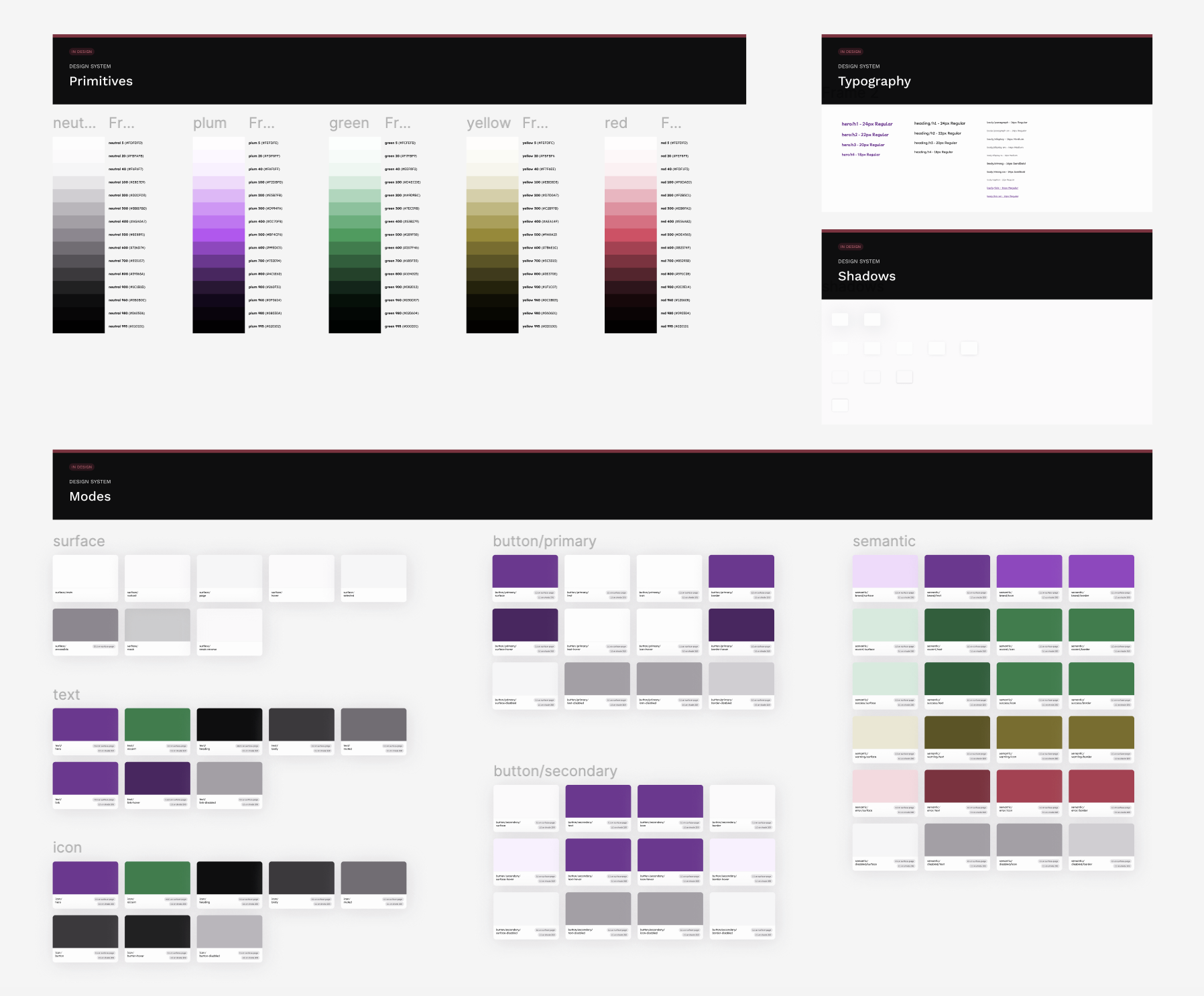
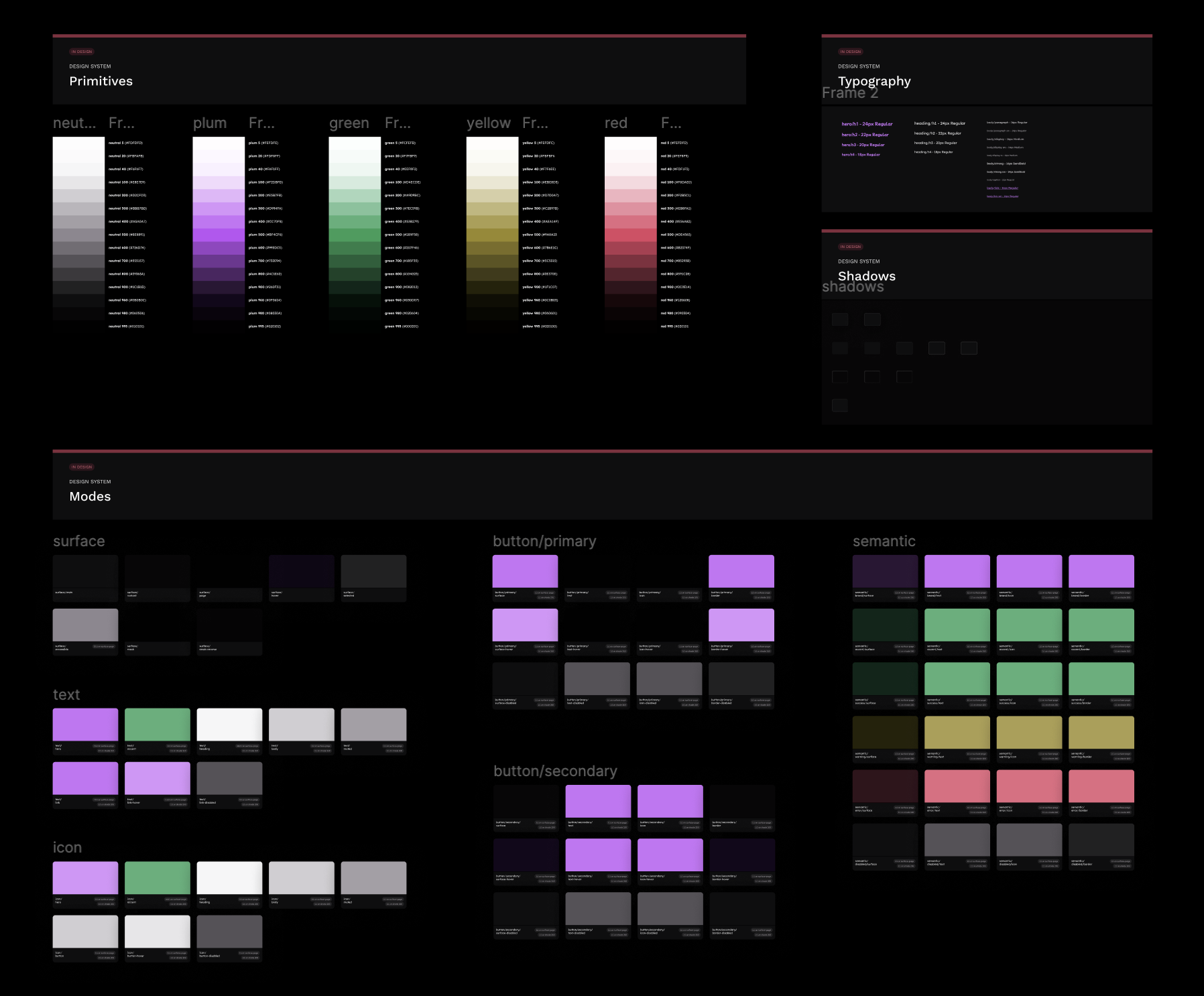
The Foundations board in Figma, showing primitive color scales, typography, shadows, and semantic Mode tokens for light and dark themes.
Designing components for design-code parity
To reduce friction between design and implementation, I aligned component APIs in Figma and React. Component properties, states, and variants share the same naming conventions, making it easier to move from prototype to production without translation or reinterpretation.
I also established clear rules for component behavior:
Interactive states such as hover, focus, and disabled are managed by the platform.
Selection and validation states are exposed as component properties.
Error and focus states can appear simultaneously, ensuring accessibility feedback is never lost.
Because the system follows the same conventions in Figma and production, components behave consistently throughout the design and development process.
Dark mode was designed intentionally rather than generated automatically. Cards use both highlights and shadows to preserve depth and hierarchy, ensuring the interface remains readable and visually consistent across themes.
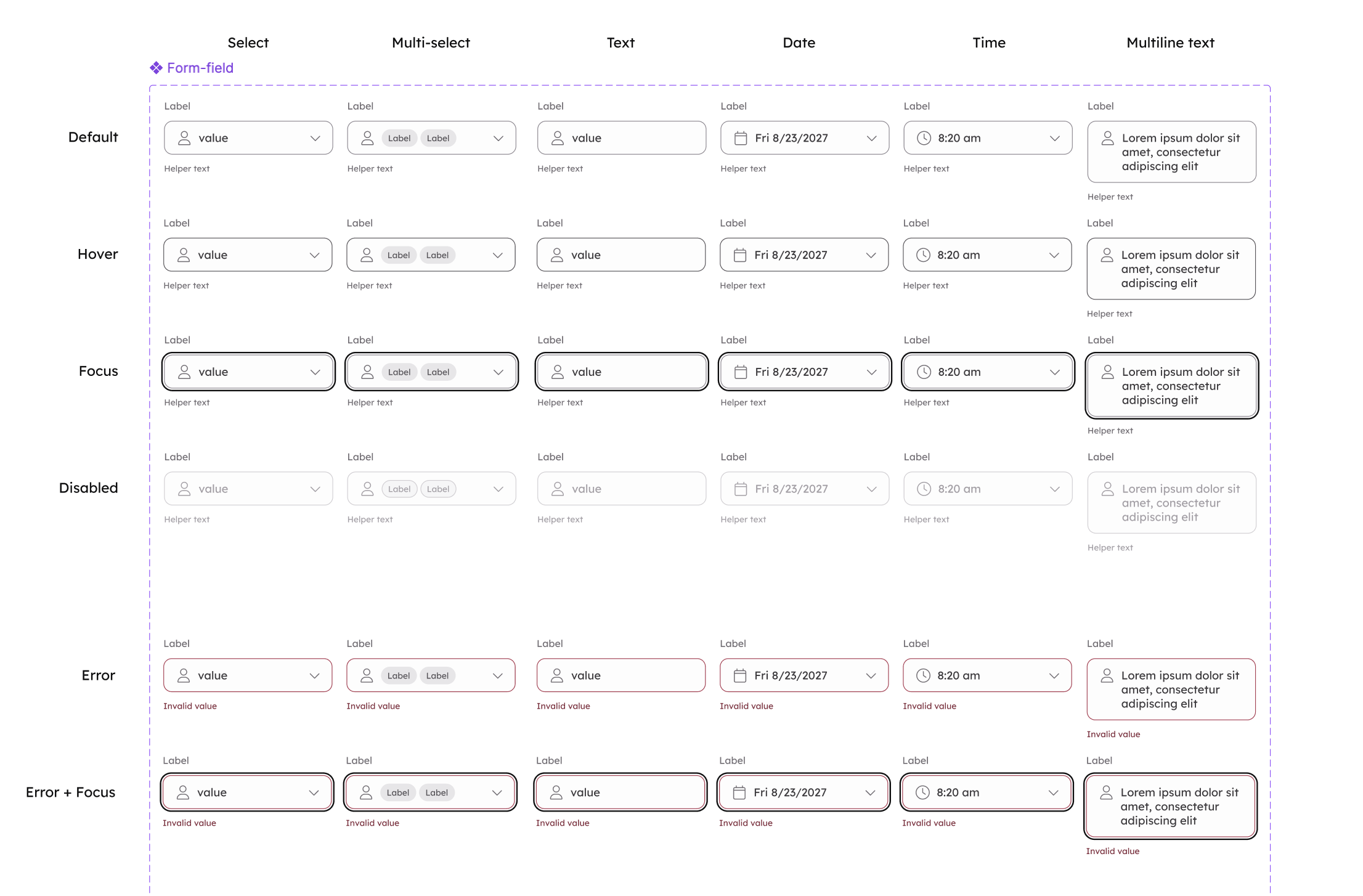
Form fields were designed as a single flexible component, supporting validation, helper text, icons, and accessibility states while maintaining a consistent experience across the product.
Working with AI as a design partner
Rather than using AI to make design decisions, I used it to accelerate implementation and quality checks.
By connecting Claude Code to Figma through the Figma MCP server, the agent could inspect components, variables, and layouts directly from the source. This allowed it to generate code, verify consistency, and identify issues that would normally require manual review.
My role remained the same throughout the project: defining product requirements, designing interactions, establishing system conventions, and deciding when a design solution was complete.
The agent handled repetitive and validation-heavy tasks. I provided the judgment.
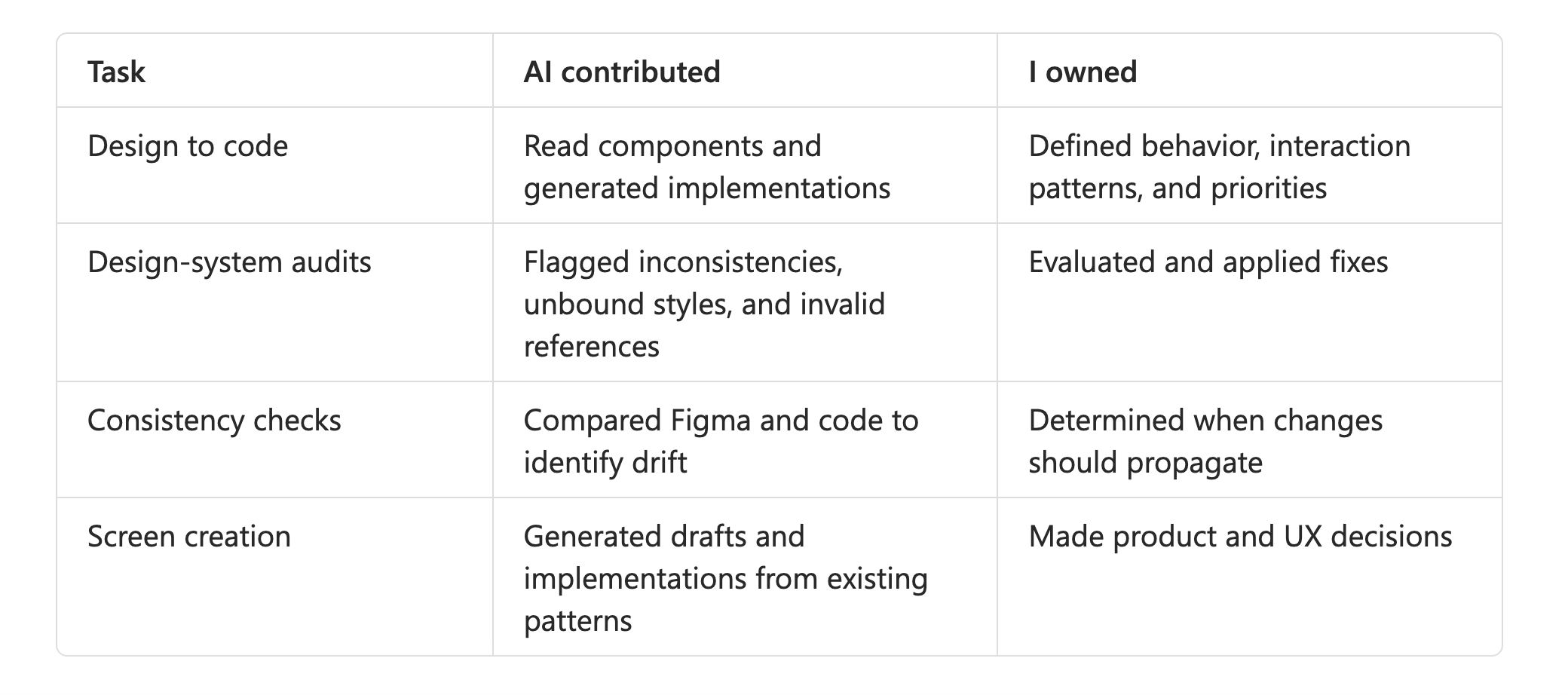
How the work was divided
Extending the system with Claude Design
I also published the TeamTeach design system to Claude Design so generated screens could use the same components, tokens, and themes used by the production application.
This provided a rapid way to explore layouts and flow ideas while maintaining visual consistency.
Generated screens served as a starting point rather than a final design. I continued refining interactions, content, and product decisions in Figma, where I could evaluate the experience in context.
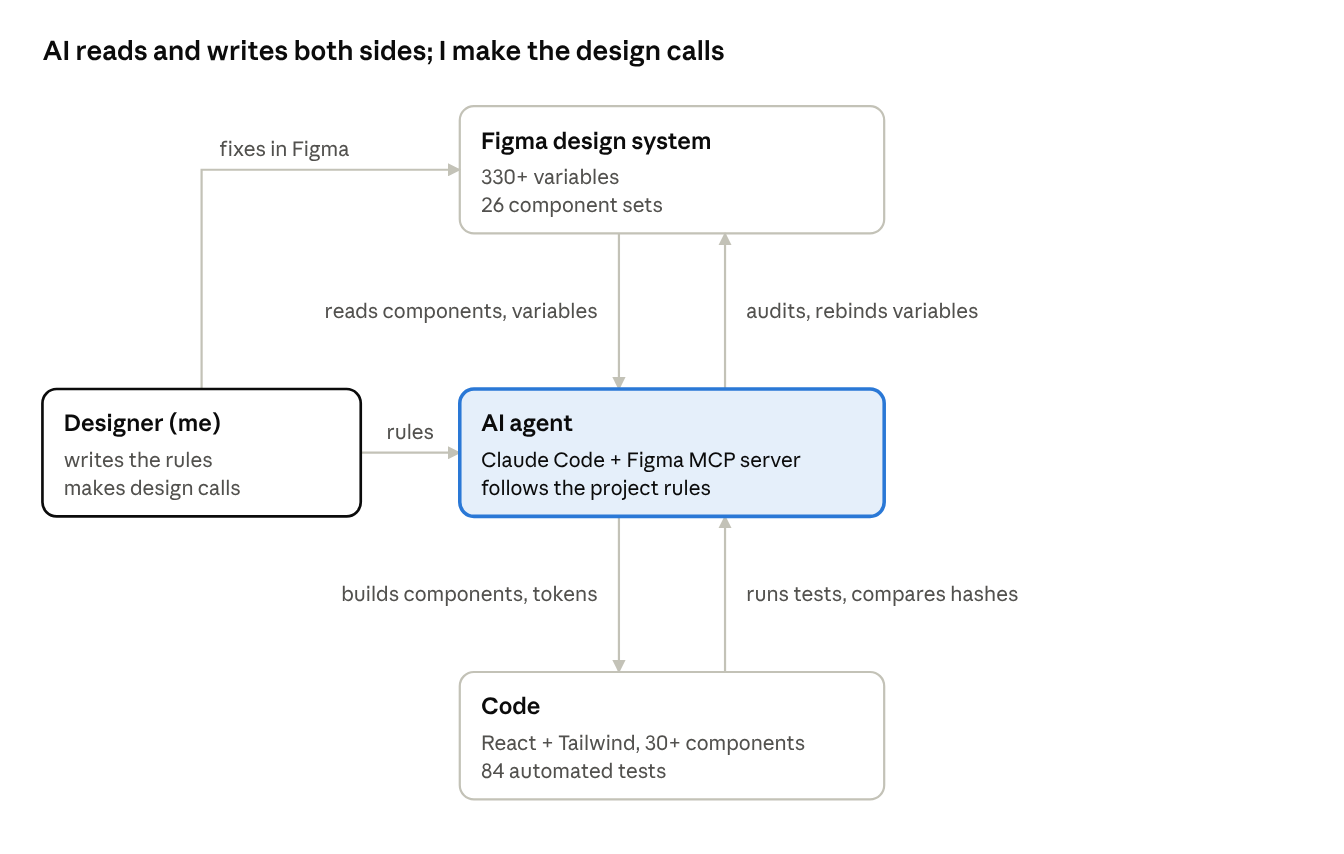
The workflow connected design and implementation through a shared system of components, tokens, and documented conventions, allowing AI to assist without becoming the decision-maker.
Onboarding around trust
Before a teacher enters information about a student, they need confidence that they're using the system appropriately and understand who will have access to what they share.
Through the design process, two questions consistently surfaced:
Am I allowed to record this information here?
Who else can see it?
The onboarding experience was designed to answer those questions before users began adding real student data.
For the MVP, I chose a teacher-led collaboration model. A teacher creates an account, adds the students they support, and invites assistants, therapists, and other staff members on a student-by-student basis. This approach made ownership and visibility easier to understand.
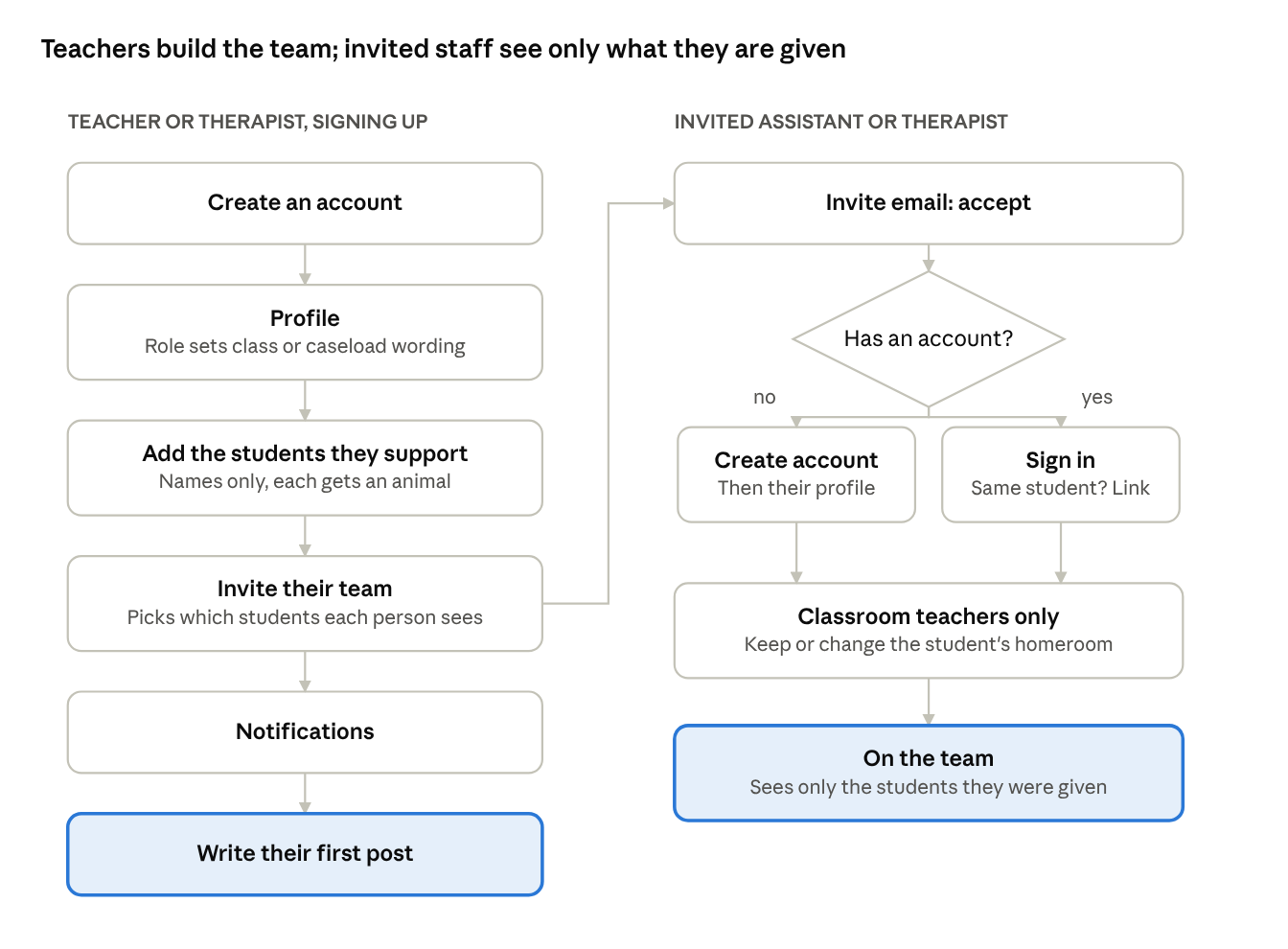
The onboarding flow establishes student ownership, team membership, and sharing expectations before teachers begin documenting observations.
Building accessibility into the system
Rather than treating accessibility as a final review step, I built it into the component library so every screen inherits accessible behavior by default. As new onboarding screens and workflows were added, they automatically benefited from the same accessibility foundations.
Key decisions included:
Generous touch targets. Interactive controls meet or exceed 48px target sizes. Smaller elements, such as checkboxes, sit within larger tappable regions that provide both the hit area and focus treatment.
Consistent focus visibility. A shared focus-ring token creates clear keyboard focus indicators across the entire product in both light and dark themes.
Native controls first. Checkboxes, radio buttons, toggles, and form fields use real HTML controls whenever possible, ensuring compatibility with screen readers, keyboard navigation, and browser autofill.
Readable disabled states. Disabled controls remain legible rather than fading into the background, helping users understand available options and current settings.
Accessible dialogs. Modal dialogs announce their content appropriately, manage focus predictably, and protect users from accidentally dismissing important warnings.
Alternative interactions. Features that support drag gestures also provide tap-based alternatives, ensuring the interface remains usable across devices and interaction styles.
High-contrast support. Surfaces that rely on depth cues such as shadows gain visible borders in high-contrast environments, preserving hierarchy and readability.
Throughout development, I tested key workflows using VoiceOver and on-device iPhone interactions to ensure accessibility considerations worked in practice, not just in theory.
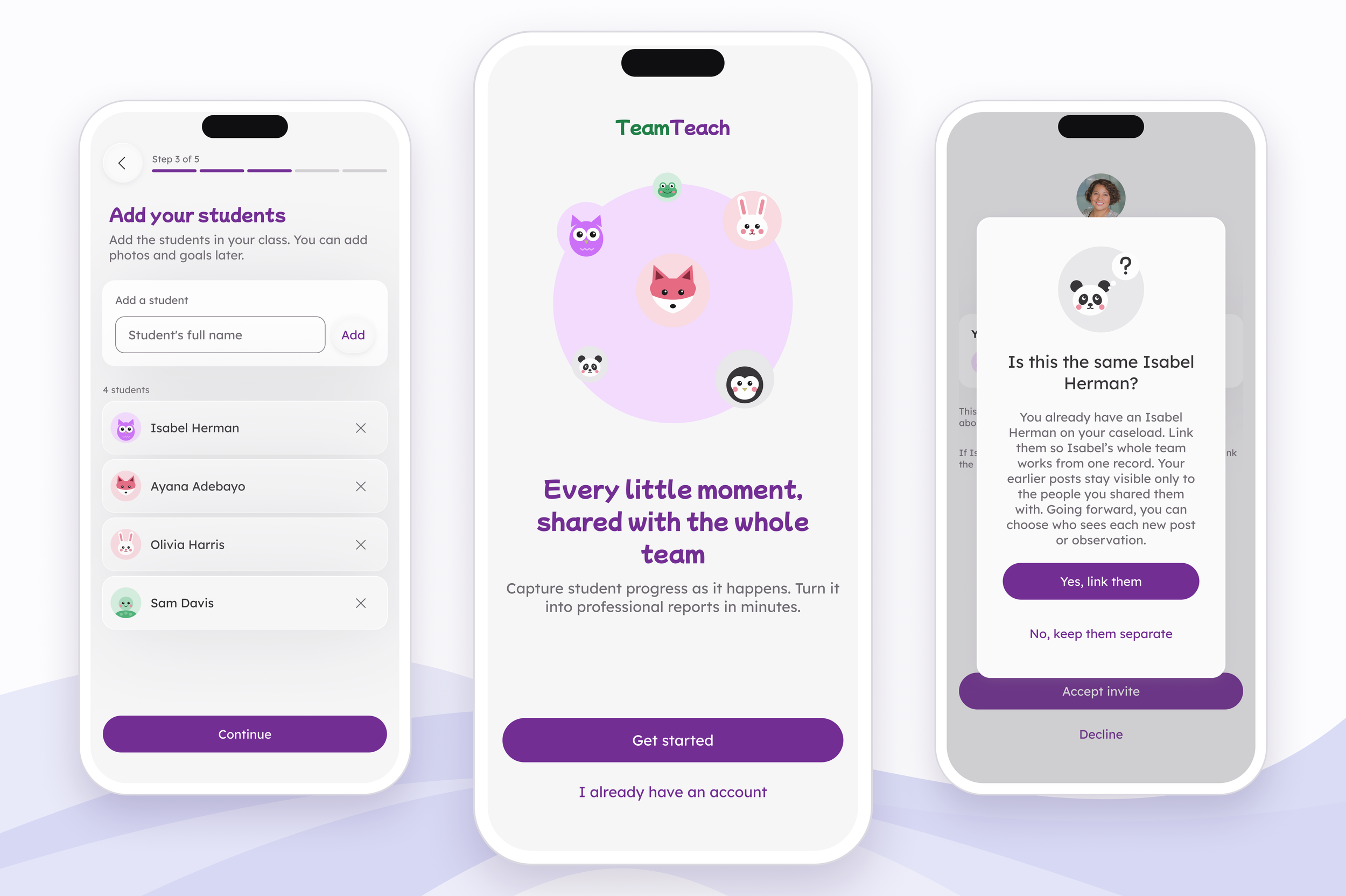
The finished TeamTeach onboarding experience, designed to help educators confidently add students, build support teams, and understand who has access to shared information.
Outcome
In two weeks, TeamTeach progressed from a design system foundation to a working product. The onboarding experience was implemented across all planned user paths, and design decisions flowed from Figma into code through a shared token architecture rather than manual styling.
Design System 330+ Figma variables across 4 collections, 18 text styles, and 12 effect styles
Components 37 production-ready components
Product 24 onboarding screens across 5 user journeys; all 5 onboarding paths implemented in code
Development 25 pull requests merged in two weeks, 130 automated tests
One unexpected outcome was that AI made the system more rigorous, not less.
Because the coding agent could only follow rules that were explicitly defined, every inconsistency became visible. Missing conventions, ambiguous component behavior, and undocumented design decisions were quickly exposed. Each gap led to either a clearer rule, a better component API, or a more robust token structure.
The result was a design system that became increasingly consistent as it was implemented. Rather than replacing design judgment, AI amplified the value of clear design principles, documentation, and system thinking.